Links to Accounting
The Donations and Accounting modules are connected so that donation entries can be easily transferred to the accounting module.
Access Links to Accounting
To access from the Button Bar, go to Special Functions > Link to Accounting

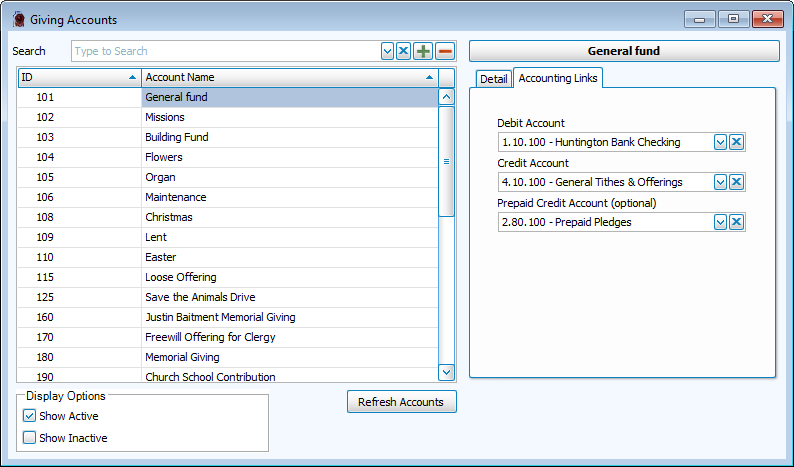
To access from Manage Accounts, go to Accounts & Pledges > Manage Accounts > Accounting Links Tab
To access from Transfer to Accounting, go to Donations > Transfer Donations to Accounting > Default Account Links Tab
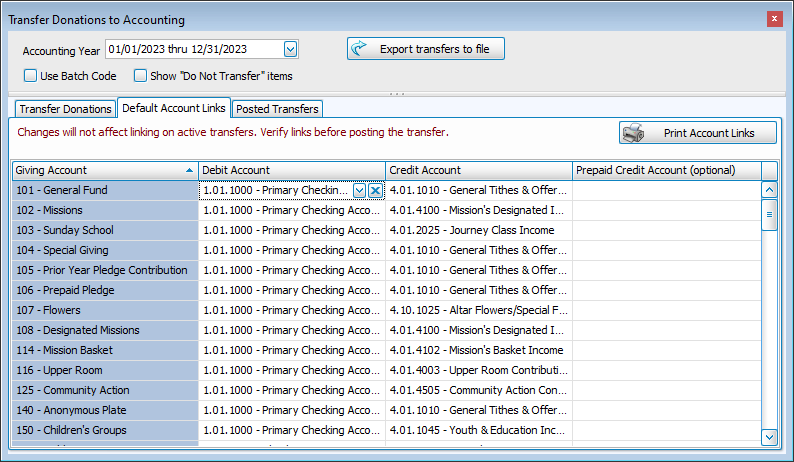
Link Giving Accounts to Chart of Accounts
Giving Account
Giving Accounts are set up in Donations. These are designations that can be assigned to all or part of a donation. These accounts can be used for designated giving such as a particular mission fund or they might be used to indicate giving on different holidays or special events even if those donations still end up in the general fund.
Debit Account
The debit account is the asset account in which the donations will be deposited.
Credit Account
The credit account is often an income account, although it could also be a liability account for pass through accounts.
Prepaid Credit Account
Prepaid accounts are liability accounts that are used for pledges given in the current year to be applied towards next years pledge. These accounts collect the prepaid funds so that they can be converted to income in the year for which they're intended.
Print Account Links
In the Transfer Donations to Accounting screen, you can see a list of all of your accounts and their corresponding links. Click the  button to produce a report listing all current account links.